- その他の便利な機能については Histogram.h を参照してください。
- 全機能を使用しているサンプルコードも参考にしてください。
ファイル > スケッチ例 > Seeed Arduino Histogram > histogramAllFunction
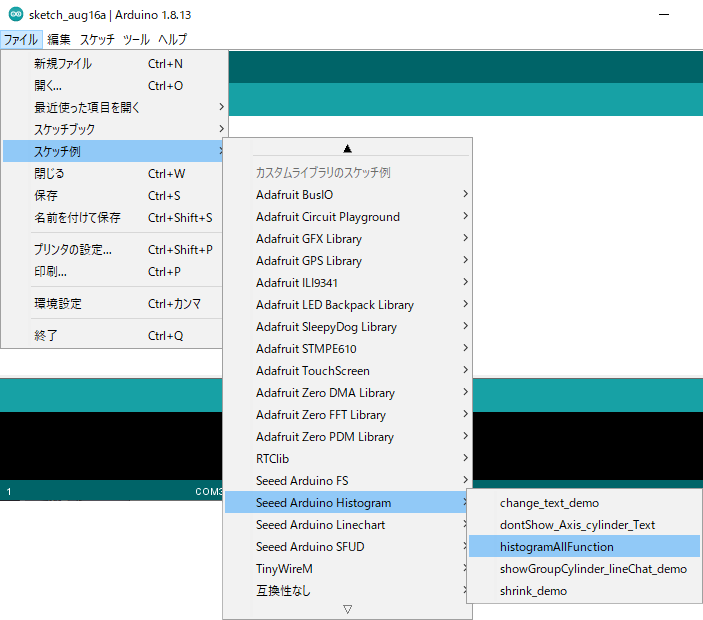
/*
  All functions of histogram
*/

#include <TFT_eSPI.h> // Hardware-specific library
#include <SPI.h>
#include"Histogram.h"

TFT_Histogram histogram=TFT_Histogram();
TFT_eSPI tft = TFT_eSPI();

void setup(void) {
  tft.init();
  histogram.initHistogram(&tft);                                             //Initialize histogram
  histogram.formHistogram("a",1,50.55,40,TFT_RED);                          //Input lable,NO,value(high),width,colour
  histogram.formHistogram("b",2,20,40,TFT_BLACK);
  histogram.formHistogram("c",3,100,50,TFT_GREEN);
  histogram.formHistogram("d",4,53,50,TFT_BLUE);
  histogram.formHistogram("e",5,133,30,TFT_YELLOW);                        //Initialize histogram
  histogram.formHistogram("f",6,53,50,TFT_ORANGE);
  histogram.formHistogram("g",7,80,50,TFT_PINK);

  histogram.showHistogram();                                                                   //The function is show  the histogram  on screen
  delay(3000);
  histogram.changeParam(6,"F",56,TFT_PINK);                                                //The function is change these parameter of the histogram
  histogram.deleteCylinder(7);                                                              //The function is delete a cylinder
}

void loop() {
  histogram.showHistogram();
  delay(2000);
  histogram.setTextSizeColourHistogram(1,2,TFT_BLACK,TFT_GREEN,TFT_WHITE);            //The function is set size of text of the histogram  and the background of screen
  delay(2000);
  showSeeed(TFT_BLUE);                                                              //Show some chars
  delay(2000);
  histogram.shrinkShowHistogram(50,60,3);                                         //The function is show histogram more little
  delay(2000);
  histogram.shrinkShowHistogram(130,180,2);                                     //The function is show histogram more little
  delay(2000);
  showSeeed(TFT_GREEN);
  delay(2000);
  histogram.notShowCylinder(3);                                             //The function is not show a cylindricity of the histogram  on screen
  delay(10);
  histogram.showHistogram();
  delay(2000);
  histogram.notShowAxis();                                              //The function is not show axes on screen
  delay(2000);
  showSeeed(TFT_MAGENTA);
  delay(2000);
  histogram.notShowtext(1);                                         //The function is not show text of a cylinder on screen
  delay(2000);
  histogram.groupCylinder(2);                                     //The function is to group these cylinders.
  delay(2000);
  histogram.lineChart(TFT_BLACK);                                // The function is to show a line chart.
  delay(2000);

  showSeeed(TFT_ORANGE);
  delay(2000);
}

void showSeeed(int colour)
{
  tft.setRotation(3);
  tft.setTextSize(3);
  tft.fillScreen(colour);
  tft.drawString("Welcome",50, 50);
  tft.setTextSize(5);
  tft.drawString("To Seeed!",50, 120);
  tft.setRotation(2);
}
 をクリックします。
